
These are instructions for the setup of your Senso4s device if you want to use refilled gas cylinder. If you want to setup your device using a new gas cylinder, please check the following vadovas.
0 ŽINGSNIS:
Kai prisijungsite prie savo „Senso4s“ įrenginio, bakstelėkite dujų baliono nustatymų piktogramą, esančią įrenginio pagrindinio ekrano kairiajame apatiniame kampe.

1 ŽINGSNIS:
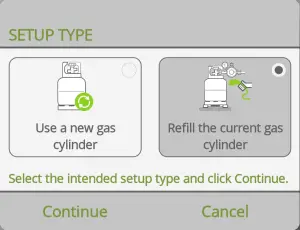
Bakstelėkite Refill the current gas cylinder and then tap Tęsti.
2 ŽINGSNIS:
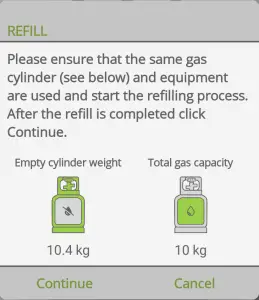
Double check the Cilindro svoris tuščio ir Bendra dujų talpa values. If both values are correct tap Tęsti.
If all steps were carried out correctly, you will see the first measurement and have successfully set up your Senso4s device after refilling your gas cylinder. If the setup failed, please check out our Trikčių šalinimo vadovas.