
These are instructions for the setup of your Senso4s device if you want to use refilled gas cylinder. If you want to setup your device using a new gas cylinder, please check the following guide.
STEG 0:
När du är ansluten till din Senso4s-enhet trycker du på ikonen för inställning av gasflaska i det nedre vänstra hörnet på enhetens startskärm.

STEG 1:
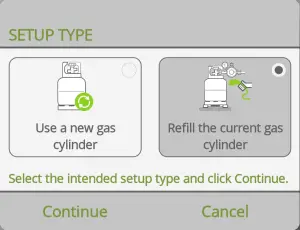
Tappa Refill the current gas cylinder and then tap Fortsätt.
STEG 2:
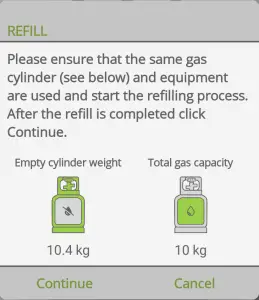
Double check the Empty cylinder weight och Total gas capacity values. If both values are correct tap Fortsätt.
If all steps were carried out correctly, you will see the first measurement and have successfully set up your Senso4s device after refilling your gas cylinder. If the setup failed, please check out our Felsökningsguide.